Know who is working, for how long, and on what
Your team clocks in from a light desktop app for Windows and Mac. Crimbox shows live who is working, idle or on a break, hours and productivity per person, the apps and websites used, screenshots, late arrivals, leave and payroll-ready reports.
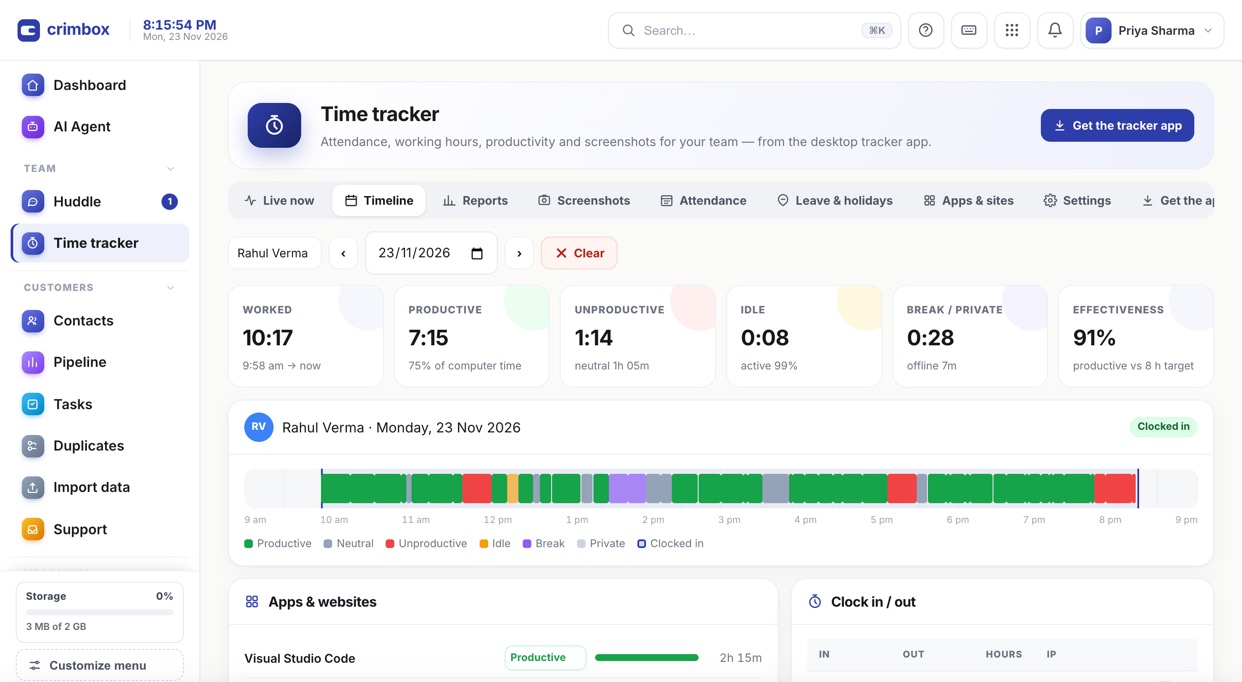
Time Tracker, done properly
Everything below is included in the Growth plan and above — no add-on, no extra subscription.
Clock in & attendance
Clock in / out with IP, late arrivals, early leaves, absences and a month attendance calendar.
Active vs idle
Keyboard and mouse activity shows real work time — never what anyone types.
Productivity score
Apps and websites marked productive, neutral or unproductive; productivity % and effectiveness.
Screenshots & daily timelapse
Every 1–60 minutes at a random moment, with blur, only while clocked in — and each day becomes a one-minute timelapse video to watch at a glance.
Leave & holidays
Staff request leave, admins approve; holidays and weekly offs built in.
Payroll-ready reports
Hours, overtime and short hours per person, exported to CSV for salaries.
What’s inside Time Tracker — 26 capabilities
Not a stripped-down add-on — the full toolkit, included in the Growth plan and above.
- Windows 10 / 11 and macOS (Apple silicon and Intel)
- Sign in with the Crimbox account or a one-time code
- Clear notice of what is recorded before it starts
- Clock in / out, break and private time
- Runs in the tray, starts with the computer
- Works offline and syncs later
- Active and idle time (idle after N minutes)
- App in front and window title (optional)
- Website domain in Chrome, Edge, Brave, Safari and Firefox (optional)
- Screenshots every 1, 5, 10, 15, 30 or 60 minutes, optional blur — kept 30 days
- Clock-in IP address
- Live board: working, idle, on a break, late, absent
- Day timeline per person with productive / neutral / unproductive time
- Top apps and websites; change a category in one click
- Daily timelapse: each person’s whole day as a one-minute video
- Screenshots of all staff grouped by person, unproductive-only filter
- Productivity % and effectiveness against the daily target
- Staff see their own data; managers see everyone
- Work hours, grace minutes, working days and daily target
- Own time zone, hours and days per person (other cities, shifts)
- Late arrivals, early leaves and absences
- Month attendance calendar for the whole team
- Leave requests and approvals, half days, holidays
- Add a missed session; automatic clock-out after long silence
- Reports with overtime and short hours; CSV export
- Retention settings for screenshots and activity
Stop paying for DeskTime, Time Doctor or Hubstaff
Live in three steps
- 1
Install the app
Windows or Mac — sign in with the Crimbox account.
- 2
Clock in
Work as usual; it runs in the tray.
- 3
See it in Crimbox
Live board, timelines and reports.
Works hand-in-hand with
Every Crimbox app shares the same customer record, so this connects to the rest on its own.
Does it track phones?
No. The tracker is a desktop app for Windows and Mac only, and it records only while the person is clocked in.
Which plan includes the Time Tracker?
It is included in the Growth plan and above (Growth starts at $16/month) — no separate add-on to buy. You can try it on the 7-day free trial.
Which computers does it run on?
Windows 10 and 11, and macOS on Apple silicon and Intel Macs. There is no phone tracking.
Does it record keystrokes or private messages?
No. It records active or idle (whether the keyboard or mouse was used), the app and website in front, and optional screenshots — only while someone is clocked in. Break and private time are not tracked.
How are screenshots stored and for how long?
In your organisation’s secure storage for 30 days, then deleted automatically — nobody can delete them earlier. Each day also becomes a one-minute timelapse video, kept for the same 30 days. You set the interval (every 1, 5, 10 minutes or more), can blur them or switch them off, and only admins see the whole team’s screenshots.
Can we use it for payroll?
Yes. Reports show hours worked, overtime and short hours per person against your daily target, and export to CSV for your salary sheet.
What happens if the internet goes down?
The app shows Offline, keeps tracking and syncs everything by itself when the connection is back (it retries every minute). Staff can’t type in time by hand.
Get Time Tracker — and everything else — in one box
Start free for 7 days. No card, no setup fee, no connector bills.
No credit card · Cancel anytime · Set up in minutes