Chat and call your team without leaving the CRM
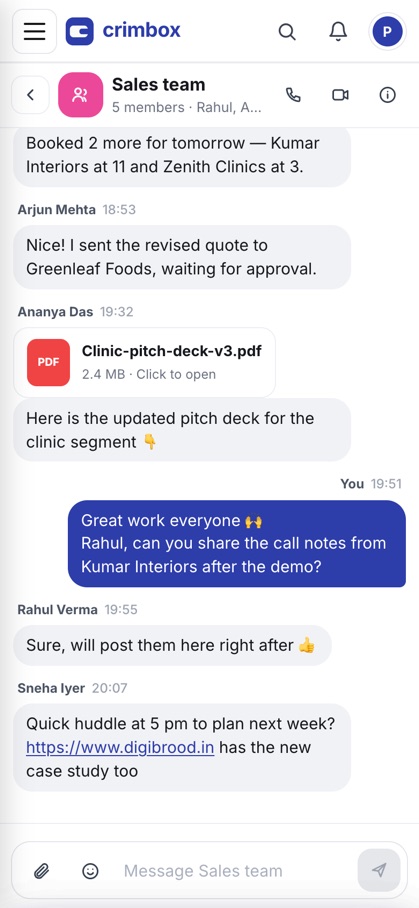
Team Chat is your team’s own chat and call room inside Crimbox. Message one-to-one or in groups from a floating chat on every page, share files and links, see who is online today, and jump on an audio or video call with screen share — only your own staff can see it.

Team Chat, done properly
Everything below is included in the Growth plan and above — no add-on, no extra subscription.
Floating chat on every page
Small chat windows pop up at the bottom of any page, like Google Chat — left or right, your choice.
Who is online today
Live presence, statuses like Busy or In a meeting, and when each person started today.
Audio & video calls
Team calls in the browser or the phone app, with mute, camera and screen share.
Files that open
Images, video, PDFs and documents open in a viewer; links are clickable.
Direct messages & groups
Talk one-to-one or make groups like “Sales team”, with unread counts and push notifications.
Private to your company
Only your organisation’s staff — never customers — and files stay in your own storage.
What’s inside Team Chat — 30 capabilities
Not a stripped-down add-on — the full toolkit, included in the Growth plan and above.
- Team Chat button at the bottom of every page with unread count
- Small chat windows along the bottom, up to three at once
- Pop chats open when a message arrives (or just notify)
- Left or right side, sound on/off — each person chooses
- Open windows stay open as you move between pages
- Round button on phones that opens Team Chat full screen
- Direct messages and named group chats
- Add or remove members; group admins and staff managers
- Reply with quote, edit and delete your own messages
- Typing indicator, Sent / Seen and “Seen by” in groups
- Bold, italic and code formatting; clickable links
- Mute and pin conversations
- Search people, groups and every message you can see
- Online now strip and People list with live status dots
- Available, Busy, In a meeting, Away, Do not disturb
- Status message with “clear after” time
- “Since 9:42 am” — first active today
- On-a-call indicator
- One-to-one and group audio calls
- Video calls and screen sharing
- Ringing card on every Crimbox page: Answer, Decline, Silence
- Join a call already in progress
- Call panel you can resize or minimise while you work
- Call history in the chat with Call back
- Works in the installed phone app
- Drag-and-drop, paste or attach files up to 25 MB
- Image, video, audio, PDF and text viewer
- Shared-files panel per chat
- Unread counts in the menu and a pop-up on every page
- Push notifications on phone and desktop
Stop paying for Slack, Google Chat or WhatsApp groups for staff
Live in three steps
- 1
Open Team Chat
From the floating button or the Team menu — nothing to install.
- 2
Message or make a group
Pick teammates and start typing.
- 3
Call in one click
Audio, video or screen share.
Works hand-in-hand with
Every Crimbox app shares the same customer record, so this connects to the rest on its own.
Can customers see Team Chat?
No. Team Chat is only for staff inside your Crimbox organisation. Customers keep talking to you on WhatsApp, Instagram, email and the other channels.
Which plan includes Team Chat?
It is included in the Growth plan and above (Growth starts at $16/month) — no separate add-on to buy. You can try it on the 7-day free trial.
Do we need to install anything?
No. Team Chat is part of Crimbox in the browser and the installed phone app. Calls use your computer’s or phone’s microphone and camera.
Can we do group video calls and share the screen?
Yes. Start a call from any chat; everyone in a group is rung, and anyone can share their screen from a computer.
Where are shared files stored?
In your organisation’s own Crimbox storage. Only members of that chat can open them, and they count towards your storage.
Is it only for our staff?
Yes. Only users of your Crimbox organisation can see each other in Team Chat — customers never can.
How are team calls charged?
Messages and files are included. Team calls use call minutes your organisation buys in packs — 100, 500, 1,000 or 10,000 minutes at ₹1 a minute, shared by everyone and valid 30 days. Every person on a call uses their own minutes: a 10-minute call between two people uses 20 minutes. Each organisation also gets 1 GB of call data a month free, then data packs from 10 GB at ₹25/GB. Lifetime Tier 3 includes 100 minutes and 1 GB once, Tier 4 500 minutes and 5 GB once.
Get Team Chat — and everything else — in one box
Start free for 7 days. No card, no setup fee, no connector bills.
No credit card · Cancel anytime · Set up in minutes